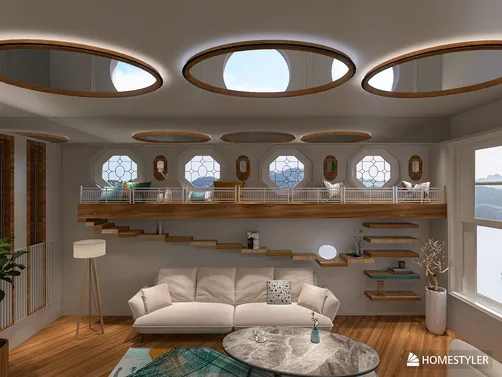
Illusion Architecture Style Decoded
Illusion Home is not a conventional interior style—it's a conceptual design movement rooted in perceptual psychology and spatial manipulation. Inspired by optical art (Op Art), Escher-like paradoxes, and modern architectural experimentation, this style challenges how we experience scale, orientation, and reality within built environments. At its core, Illusion Home invites designers to treat space as malleable: walls tilt without collapsing, ceilings slope to elongate rooms, mirrors multiply volume, and faux windows project impossible vistas. The Homestyler 3D rendering platform empowers creators to test these ideas instantly—simulating light angles, adjusting material reflectivity, and rotating camera perspectives in real time to validate illusion efficacy before physical execution.

Casa de Banho by graca doutel
Design Your Dream BathIn Homestyler, achieving mirror-based spatial expansion like this compact bathroom requires just three steps: (1) Insert a full-height mirrored wall using the 'Materials > Reflective' library; (2) Adjust HDR environment lighting (e.g., 'g_city_park') to cast realistic ambient reflections; (3) Use the 'Camera Orbit' tool to preview from multiple vantage points—ensuring the reflection reads as continuous space, not a disjointed surface. This exemplifies how Homestyler transforms theoretical illusion principles into actionable, render-ready design decisions.
🌀 Tilted Architecture & Dynamic Balance
Tilted architecture deliberately destabilizes gravitational expectations—slanting walls, cantilevered floors, or leaning façades generate kinetic tension that tricks the eye into perceiving motion or expanded volume. Unlike structural gimmicks, successful tilt integrates engineering logic (e.g., counterbalanced masses) with aesthetic rhythm. In Homestyler, users apply tilt via the 'Rotate Wall' function under Advanced Editing, then verify structural coherence using real-time shadow studies across daylight hours—ensuring the illusion feels intentional, not accidental.

Architectural Balance by Amy ✨
Start Free Home DesignAmy’s award-winning two-storey home leverages Homestyler’s precise angle controls (±0.1° increments) to achieve its signature lean—then uses synchronized sunlight animation to cast elongated, directional shadows that reinforce the sense of dynamic imbalance. Homestyler’s physics-aware rendering ensures tilted surfaces interact authentically with light sources, making the illusion legible at all viewing angles—a capability unavailable in static modeling tools.
🪞 Reflective Surfaces & Spatial Multiplication
Mirrors, polished metals, and glossy finishes act as perceptual amplifiers—visually doubling square footage, fragmenting sightlines to obscure boundaries, or layering depth through recursive reflection. Critical to success is strategic placement: avoiding direct sightlines to cluttered zones, aligning reflective planes with key focal points (e.g., a window or artwork), and calibrating reflectivity to match ambient light levels. Homestyler’s Material Editor allows instant adjustment of 'Reflectivity' and 'Roughness' sliders—enabling rapid A/B testing of mirror intensity to prevent glare or disorientation.

Illusion by Anne Ottosson
Free Luxury Home DesignAnne’s dining room uses tile flooring—not mirrors—as its primary illusion engine: large-format, linear-laid porcelain tiles with subtle veining create forced perspective, guiding the eye toward a recessed alcove. In Homestyler, this was achieved using the 'Floor Pattern Alignment' tool + custom texture scaling, then validated via orthographic floor plan view to confirm vanishing point accuracy. Homestyler’s real-time texture tiling preview eliminates guesswork—making spatial illusion accessible even without advanced drafting skills.
🎨 Light-Shadow Choreography & Perceptual Layering
Light and shadow are not passive elements—they’re active illusionists. Strategic chiaroscuro (e.g., spotlighting a narrow hallway while dimming adjacent zones), projected pattern shadows (via laser-cut screens), or HDR-simulated golden-hour gradients can compress, stretch, or fracture perceived dimensions. Homestyler’s sun-path simulator and multi-light layer system lets designers place up to 4 independent light sources (key, fill, rim, ambient), assign color temperatures, and animate transitions—turning lighting design into a precision instrument for perceptual manipulation.

Reflection by Rutchevelle Den Ouden, ND
Begin Rustic Dining DesignThis design deploys Homestyler’s ‘Slope Ceiling’ tool to create a dramatic downward pitch—then pairs it with directional spotlights set to 3200K temperature and 15° beam angle, casting elongated, converging shadows along the slanted plane. The result? A forced perspective that visually extends ceiling height by 40%. Homestyler’s real-time shadow preview updates instantly when adjusting light position or ceiling angle—transforming complex light-shadow choreography into an intuitive, iterative process.
FAQ
Q: What does 'make a 50㎡ area appear like 100㎡' mean in practical design terms?
It refers to perceptual expansion—not physical enlargement. Techniques include using full-height mirrors to double depth perception, installing linear flooring patterns that guide the eye toward a focal point, selecting ultra-light wall colors to reduce visual weight, and eliminating visual 'stops' (e.g., bulky furniture against walls). Homestyler’s Area Analysis tool helps quantify actual vs. perceived spatial efficiency before finalizing layouts.
Q: Can I create tilted walls or faux windows in Homestyler without coding or plugins?
Absolutely. Homestyler’s native 'Advanced Wall Editing' includes tilt, rotate, and shear functions—all accessible via right-click context menus. Faux windows are created using the 'Opening Tool' + custom frame textures from the Materials Library (e.g., 'Glass > Frosted' or 'Decal > Sky View'). No external software or technical expertise required.
Q: How does Homestyler ensure illusions look convincing in different lighting conditions?
Homestyler renders with physically accurate light behavior: each material has assigned reflectivity, roughness, and translucency values; HDR environments (e.g., 'g_sea_sky', 'moonlit_golf') simulate real-world sky luminance distribution; and the sun-path slider adjusts both direction and intensity. This means your mirror placement or tilted wall will cast believable shadows at dawn, noon, and dusk—verified in one click.

Emily 69" Acrylic Bathtub by Wyndham Collection - White


Empava Freestanding Bathtub, 59" Soaking, Acrylic
Homestyler offers an easy-to-use online design tool with stunning 3D renderings, inspiring interior projects, and helpful DIY video tutorials—perfect for bringing your home design ideas to life effortlessly.
Projete agora para LIVRE