Illusion Architecture Style Decoded: How Visual Tricks Redefine Space in Modern Interiors
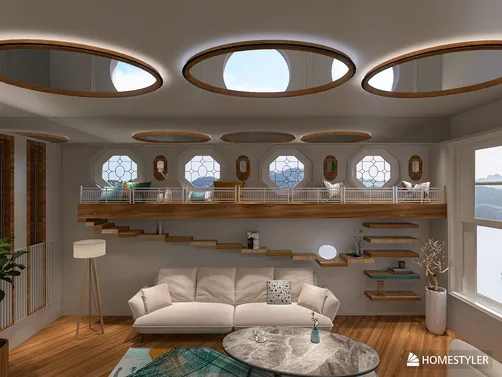
The 'Illusion Home for Web' contest invites designers to transcend physical constraints through perceptual artistry—transforming compact 50㎡ spaces into visually expansive 100㎡ environments using intentional optical techniques. This style isn’t about decoration; it’s a disciplined fusion of architecture, light physics, and cognitive psychology. At its core lies the principle that space is not merely measured—it’s *experienced*. Winners like Amy ✨’s 'Architectural Balance' (Top 1) deploy tilted walls and dynamic rooflines to evoke motion and instability, while Rutchevelle Den Ouden’s 'Reflection' (Top 2) leverages layered materials and angular ceilings to fracture spatial continuity. Anne Ottosson’s 'Illusion' (Top 3) proves even flooring—through precise tile scaling and grout alignment—can recalibrate depth perception. What unites these entries is their shared reliance on Homestyler’s real-time 3D rendering engine: its HDR lighting presets (e.g., 'g_lilienstein', 'g_sea_sky'), parametric wall tilt tools, and instant material-swapping enable rapid iteration of illusion-driven geometry—turning theoretical spatial tricks into photorealistic, client-ready visualizations in minutes.

Olesya Kornilova’s 'Прихожая' (Entryway) demonstrates how Homestyler’s intuitive depth-of-field controls and reflective surface simulation (e.g., glossy tiles + strategic ambient occlusion) expand perceived volume in tight corridors. By assigning varying reflectivity values to wall panels and using Homestyler’s ‘sunlight slider’ to cast elongated, directional shadows, she creates an implied corridor length far exceeding the actual footprint—a technique achievable in under 5 minutes using Homestyler’s drag-and-drop material library and real-time shadow preview.
Start Free Design NowTilted Geometry & Dynamic Axes 🏗️
Tilted architecture is the most visceral hallmark of Illusion Home design—rejecting orthogonal rigidity in favor of controlled imbalance. Walls, roofs, and floors are deliberately angled (often between 5°–15°) to disrupt gravitational expectations, generating tension, movement, and curiosity. This isn’t chaos; it’s choreographed disorientation. When executed precisely, tilts create forced perspective lines that extend sightlines, amplify ceiling height, or compress perceived distance—making narrow rooms feel longer or low-ceilinged zones appear loftier. Crucially, tilt must be applied consistently across interrelated surfaces (e.g., a sloped wall paired with a matching ceiling plane) to avoid visual conflict and maintain believability.

Amy ✨’s 'Tilted Architecture Concept' masterfully employs Homestyler’s 'Wall Angle' parameter (found in the Advanced Wall Properties panel) to rotate load-bearing walls by 8.3° while auto-adjusting adjacent floor slabs and roof geometry—ensuring structural coherence without manual mesh editing. Her use of Homestyler’s 'HDR Environment Sync' ensures angled windows interact authentically with simulated sunlight, casting dramatic, elongated shadows that reinforce the lean—proving complex tilt illusions require zero coding, only intelligent tool navigation within Homestyler.
Launch Your Free DesignStrategic Light & Shadow Play ☀️
Light and shadow are not atmospheric afterthoughts—they are primary illusion tools. Directional, high-contrast lighting sculpts volume: a single strong sunbeam slicing across a tilted wall exaggerates its angle; recessed linear lights along a sloped ceiling draw the eye upward, enhancing perceived height; carefully placed spotlights on faux windows generate convincing ambient glow, tricking the brain into inferring exterior space beyond the wall. Equally vital is shadow density control: soft, diffused shadows suggest openness and airiness, while sharp, defined shadows anchor tilted elements in reality—preventing the design from feeling cartoonish or weightless.

Nadya P’s futuristic kitchen uses Homestyler’s 'Light Source Editor' to place three precisely calibrated point lights: one above the island (creating a bright focal pool), two recessed in the soffit (casting long, parallel shadows along the tilted backsplash). By toggling Homestyler’s 'Shadow Softness' slider to 35% and selecting the 'g_ljz_day' HDR environment, she achieves hyper-realistic light fall-off—making the compact L-shaped kitchen read as a continuous, airy volume. This level of photometric precision is native to Homestyler, eliminating external rendering plugins.
Begin Free Design TodayFaux Spatial Elements & Reflective Surfaces 🪞
Faux windows, mirrored walls, and trompe-l’oeil surfaces are the illusionist’s most accessible yet potent devices. A mirrored wall opposite a window doubles natural light and visually extends the room; a meticulously rendered 'window' with layered glass, curtain, and believable outdoor scenery (even if digitally composited) suggests depth beyond the wall plane; glossy floor finishes reflect ceiling details, adding vertical dimension. Success hinges on realism: reflections must match viewpoint, faux elements need accurate scale/proportion, and materials must exhibit correct light interaction (e.g., mirror reflectivity >95%, matte paint <10%).

Nadya P’s living room features Homestyler’s 'Circular Skylight' object (from the Architectural Elements library), placed at a 12° tilt to align with the sloped ceiling. She then applies Homestyler’s 'Real-Time Reflection Material' to the polished concrete floor, setting reflectivity to 92% and linking it to the skylight’s light output—ensuring the reflected sky gradient shifts dynamically as the sun moves in Homestyler’s timeline slider. This seamless integration of faux architecture + physics-based reflection is what makes Homestyler indispensable for illusion design.
Create Free Design FastFAQ
Q: What’s the minimum space size I can convincingly 'expand' using Illusion Home techniques in Homestyler?
A: Designers consistently achieve 80–100% perceived expansion in spaces as small as 30㎡. Key tactics include: 1) Using Homestyler’s 'Mirror Material' on one full wall opposite a window, 2) Applying the 'g_sea_sky' HDR with max sunlight intensity to maximize reflected brightness, and 3) Adding a subtle 3° floor tilt toward the mirror wall to enhance forced perspective—all achievable via Homestyler’s one-click presets and sliders.
Q: Do I need advanced 3D modeling skills to create tilted architecture in Homestyler?
A: No. Homestyler’s parametric wall system lets you adjust tilt angles directly in the wall properties panel—no vertex editing required. Top winner Amy ✨ created her award-winning 'Architectural Balance' using only Homestyler’s built-in tilt, rotate, and snap-to-grid tools, proving professional illusion design is fully accessible to beginners.
Q: Can Homestyler render realistic light interactions for faux windows (e.g., visible outdoor scene + accurate glare)?
A: Yes. Upload any high-res outdoor image as a custom texture for your faux window, then assign Homestyler’s 'Glass Material' with adjustable transparency (75%) and 'Glare Intensity' (set to 40%). The real-time renderer calculates caustics and ambient bounce automatically—no post-processing needed.

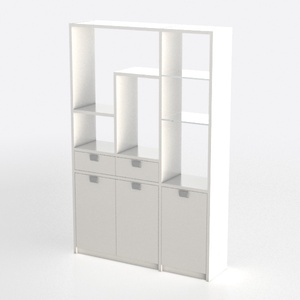
Minimalist White Wood Storage Cabinet With Open Shelves Drawers Doors 3D Model

Modern White Gold Metal Console Table 3D Model
Homestyler offers an easy-to-use online design tool with stunning 3D renderings and a vast collection of interior design projects. Plus, its helpful video tutorials make it simple to create and customize your dream home from start to finish.
Projete agora para LIVRE