Art Corner Design
An art corner is a dedicated, intentionally curated zone within a living space—such as a living room, hallway, bedroom nook, or even a compact apartment alcove—that centers visual storytelling through artwork, framing, lighting, and spatial harmony. Unlike generic wall decor, an art corner integrates painting (physical or AI-generated), 3D-framed displays, furniture placement, ambient light, and surrounding textures to create emotional resonance and narrative continuity. It reflects personal identity, memory, or aesthetic philosophy while responding dynamically to architectural constraints—e.g., window orientation, ceiling height, traffic flow, and adjacent functional zones. As demonstrated in the 'My Art Corner' contest, successful examples treat the corner not as an afterthought but as a *spatial protagonist*, where interior design, human behavior, and AI-powered creativity converge in service of soulful indoor space planning.
Design Challenges & Common Pitfalls
Designing a compelling art corner presents unique challenges: (1) Visual imbalance—overcrowding or underscaling artwork relative to wall area or furniture; (2) Contextual dissonance—mismatched style, color temperature, or materiality between artwork and surroundings (e.g., a vibrant abstract piece against sterile minimalism without transitional elements); (3) Lighting neglect—relying solely on overhead fixtures instead of layered, directional light that enhances depth, texture, and frame shadow play; (4) Spatial isolation—placing art as a standalone object rather than weaving it into circulation paths, sightlines, or seating arrangements. These issues often stem from overlooking how art functions *relationally*: it must converse with walls, windows, furniture scale, and human posture—not just hang statically.
✅ Prioritize Visual Hierarchy & Scale Harmony
A strong art corner begins with intentional sizing and composition. The artwork’s scale should relate proportionally to both the wall surface and adjacent furniture—for example, a large framed piece above a sofa should span ~⅔ the sofa’s width and sit 6–8 inches above its backrest. Avoid centering art on an empty wall; instead, anchor it to functional anchors (sofa, console, fireplace) and use negative space deliberately. Homestyler AI design tools help simulate real-time scale adjustments: upload a room photo, generate AI Painter artworks at varying dimensions, and preview 3D frames in context before finalizing layout—enabling precise indoor space planning without physical trial-and-error.

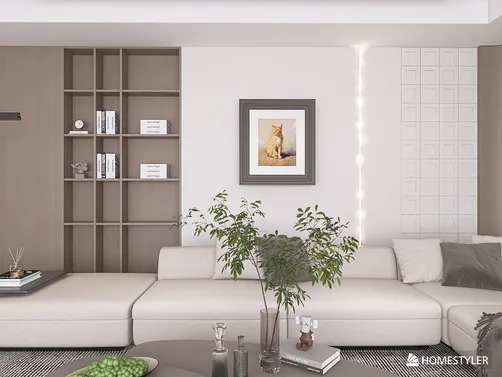
Qwanticulus Retinaplacer’s '【a r t c o r n e r】' exemplifies scale harmony: a medium-sized framed artwork is centered above a low-profile sofa, flanked symmetrically by potted plants and a textured rug—creating vertical rhythm without visual weight overload. Using Homestyler AI design tools, they likely uploaded the base living room image, generated a stylized AI painting matching the warm-toned upholstery and daylight HDR ('d_peoples_square'), then placed the 3D-framed result at optimal eye-level height (≈57–60 inches from floor to center). This demonstrates how AI-assisted interior design bridges conceptual vision and spatial precision in real-world indoor space planning.
Start Free Design💡 Curate Light, Texture & Material Dialogue
Light transforms static art into experiential presence. Layer ambient (ceiling), task (wall sconces), and accent (picture lights or adjustable track spots) to sculpt depth and highlight brushwork or frame grain. Equally vital is tactile cohesion: pair matte paintings with linen upholstery, glossy prints with lacquered consoles, or textured canvases with woven jute rugs. Homestyler’s HDR environment presets (e.g., 'g_northern_snow', 'g_ljz_day') let designers preview how natural light interacts with different wall finishes and artwork surfaces—empowering data-informed decisions for holistic interior space planning.

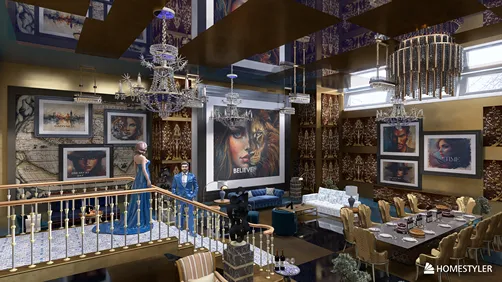
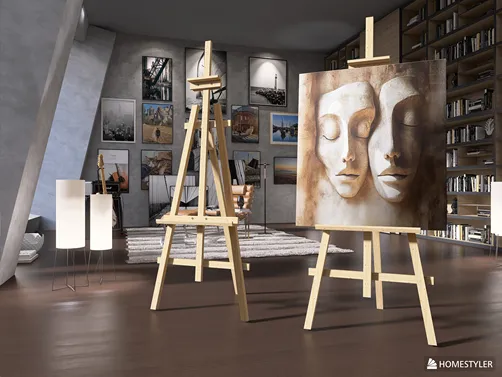
Cecilia Botha’s 'The Art corner' leverages luminous HDR ('g_qwantani') to cast soft, diffused daylight across a vaulted living room—allowing ornate gold frames and velvet sofa textures to coexist without glare or flatness. Her use of tall, slender floor lamps beside the seating group adds vertical accent light that grazes the canvas surface, enhancing its dimensional quality. Through Homestyler AI design tools, she could have iterated lighting placements virtually, testing dozens of fixture types and angles before settling on this balanced interplay—showcasing advanced Homestyler design techniques for emotionally resonant lighting integration.
Begin Your Free Design🌍 Anchor Art in Human-Centered Spatial Flow
An art corner gains meaning only when experienced—not just viewed. Position it along natural movement paths (e.g., entryway to kitchen, hallway bend, or beside a reading chair) and align sightlines with seated or standing eye levels. Integrate interactive elements: a nearby side table for sketchbooks, a built-in bench for contemplation, or mirrored surfaces to extend perception. Homestyler’s drag-and-drop furniture library and real-time walk-through mode enable designers to simulate user movement, verify sightline clarity, and refine circulation—turning theoretical layouts into intuitive, lived-in environments grounded in human-centered interior space planning.

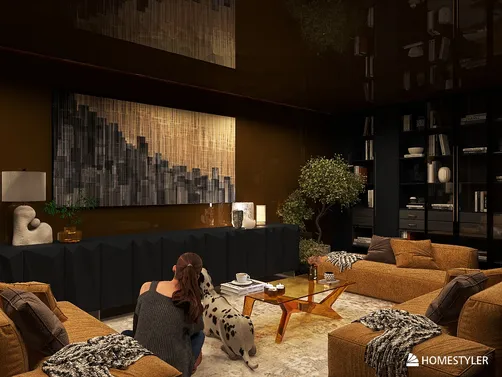
Yuliya Isaeva’s '«Айвазовский home»' embeds the art corner within a relaxed lounge triangle: a curved sofa faces a low credenza topped with a framed seascape, positioned directly beneath a pendant light—creating a natural pause point during room traversal. The tropical beach HDR ('g_tropical_beach') reinforces the artwork’s coastal theme while warming skin tones in virtual walkthroughs. By using Homestyler AI design tools to test multiple sofa orientations and lamp heights, she ensured the composition invites lingering—not passive observation—exemplifying how strategic spatial flow elevates art from decoration to destination.
FAQ
Q: Do I need prior design experience to join the My Art Corner contest?
Not at all. The contest welcomes beginners and professionals alike. Homestyler’s AI Painter requires only an uploaded photo—you don’t need drawing skills. Built-in tutorials, style presets, and real-time 3D rendering make interior space planning accessible to all.
Q: How does AI Painter integrate artwork into my actual room layout?
AI Painter analyzes your uploaded room image, detects wall geometry and lighting conditions, then generates a stylistically matched artwork *and* renders it as a photorealistic 3D framed piece placed precisely on the wall—complete with accurate shadows, reflections, and scale relative to furniture. This is core to intelligent indoor space planning.
Q: Can I submit multiple entries—and are there style restrictions?
Yes! You may submit up to 4 designs (per tool limit). There are zero style limitations: minimalist, maximalist, vintage, biophilic, or AI-surrealist—all qualify. What matters is how thoughtfully you integrate art into spatial logic, lighting, and human experience.
Q: What’s included in the free AI Painter credit?
One complimentary credit gives full access to AI Painter’s core features: image upload → style selection (e.g., oil, watercolor, pixel art) → automatic 3D framing → real-time scene compositing. It’s designed to lower barriers to entry for creative interior space planning.

Modern Marble Top Fluted White Gold Accent Round Coffee Table 3D Model

Minimalist White Solid Wood Square Coffee Table 3D Model

Black Stainless Steel Espresso Coffee Machine 3D Model
Homestyler offers an easy-to-use online design tool packed with 3D renderings, inspiring interior projects, and helpful DIY video tutorials. It’s ideal for anyone looking to create and visualize stunning home designs effortlessly. Give your space a fresh new look with Homestyler!
Projete agora para LIVRE