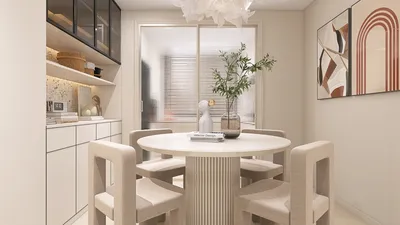


In today’s digital age, immersive experiences like those offered by virtual reality platforms such as Stranger Than Heaven invite us to rethink how our living spaces can support new forms of entertainment and interaction. As technology integrates seamlessly into everyday life, designing home environments that accommodate cutting-edge gadgets and promote comfortable, engaging experiences becomes essential. Thoughtful spatial planning and adaptable furniture can transform any room into a personal sanctuary for both relaxation and innovative digital exploration.
Every home design project begins with a blank space, exact dimensions, and the gap between the current condition and the desired outcome. The primary challenge isn’t envisioning the end result—most individuals have a clear idea—but rather converting that vision into a tangible plan that can be assessed, modified, and confidently shared.
A complimentary home design floor plan creator can bridge this divide. By inputting precise room measurements, constructing walls step-by-step, selecting furnishings from a library of realistically scaled items, and culminating in a photorealistic 3D rendering, users can visualize the completed space prior to purchasing furniture or painting walls. In 2026, such comprehensive workflows operate entirely in-browser without any fees, with platforms like Homestyler leading the way.
This comprehensive guide outlines the process from a blank slate to a detailed 3D visualization ready for decision-making.
Why Prioritize the Floor Plan?
The floor plan forms the backbone of all subsequent interior design choices. While colors, furniture styles, and lighting are important, none matter if the spatial arrangement is flawed. A room with improper furniture placement will feel off, no matter how exquisite the finishing touches.
Focusing initially on the floor plan ensures the proper order of decisions. Establishing room dimensions before selecting furnishings guarantees that chosen pieces fit well rather than guessing. Circulation paths are mapped before placing sofas, ensuring the layout supports practical use instead of mere aesthetics. Understanding the interplay between windows and furniture placement allows natural light to enhance the environment instead of clashing with it.
The 3D visualization at the end of this method is not mere decoration—it serves as verification by addressing questions that 2D plans cannot: does the space feel comfortable and inviting in reality?
What Characteristics Define a Valuable Home Design Floor Plan Tool?
Many free versions of design software either limit functionality artificially or provide genuinely useful features. When choosing a platform, verify these essentials:
Complete room layout tools that allow exact wall measurements, door and window positioning, and inclusion of architectural elements like angled walls or built-in niches. Approximated rooms lead to designs that may not translate well in real life.
A furniture catalog featuring pieces with authentic dimensions. Generic placeholders don’t support informed decisions, but items modeled on actual product sizes turn designs into practical guides for purchasing.
Seamless integration of 2D and 3D perspectives within the same tool. Instant updates across views keep spatial understanding consistent without needing file conversion or multiple apps.
Realistic rendering capabilities that simulate light, shadow, and texture behaviors true to physical properties. This helps users envision how finishes and lighting truly affect their space.
Full access to the entire workflow for free, including 3D rendering. Many tools restrict 3D preview behind paywalls, but the most effective platforms allow comprehensive use without subscriptions.
The Leading Free Home Design Floor Plan Platform in 2026
Among free solutions available in 2026, Homestyler stands out as a fully featured floor plan tool without hidden fees. It supports precise wall drawing, accurate placement of doors and windows, furnishing from a vast library, and real-time 3D rendering using physically based lighting techniques.
The breadth of its model library matters because it reflects the true variety of furniture and decor you can purchase, making your floor plan a direct aid in real-world decisions.
With rendering quality comparable to professional interior photography, Homestyler’s output surpasses basic architectural sketches, offering realistic and compelling visuals for sharing with clients, partners, or contractors.
Its free tier includes unlimited projects, full furniture access, and standard-quality renders without requiring payment or subscriptions. Projects can be saved and effortlessly shared via links accessible without accounts.
Step-by-Step Workflow: From Measurements to 3D Visualization
Start by carefully measuring every wall dimension, door and window position and size, ceiling height, and fixed architectural features like columns or built-ins. This step ensures accuracy in all subsequent digital work, creating a trustworthy foundation for design.
Typically, measuring a single room takes around 10 minutes, while an entire apartment can require between 30 to 45 minutes depending on complexity.
Input these exact measurements into the design tool: construct walls correctly, place doors with their appropriate swinging arcs, and position windows accurately. Include architectural details as fixed elements to reflect the real space faithfully.
This structural groundwork might feel less creative but is crucial, as an imprecise room shell will generate flawed floor plans that might fail when implemented.
Next, define functional zones within the room before placing any furniture—for example, seating, entertainment, and circulation areas in a living room, or sleeping, dressing, and storage zones in a bedroom. This ensures furniture supports intended activities rather than forcing functions after the fact.
Anchor your design by positioning main pieces first: sofas in living areas, beds in bedrooms, and dining tables in eating spaces. Secondary elements like side chairs, storage units, and lighting fixtures arrange themselves around these key items.
Use on-screen dimension indicators to maintain minimum clearance—for instance, 36 inches for main walkways, 24 inches beside beds, and 36 to 48 inches around dining tables—to ensure layouts are both livable and functional.
Once satisfied with the 2D layout, switch to 3D mode to refine surface finishes, such as flooring materials, wall paint, furniture textures, and lighting placement. The 3D view reveals how these choices influence spatial perception, something impossible in 2D.
At this stage, the design shifts from a spatial blueprint to a visual concept, culminating in renders that effectively communicate the intended space to collaborators or contractors.
Finally, generate high-quality renders from the 3D view. Homestyler's free plan delivers suitable quality for sharing or presenting designs. Exports can be images or sharable project links, allowing recipients to interact with the model without needing an account.
Avoiding Common Floor Plan Pitfalls
One prevalent mistake is placing furniture without considering door swing paths, leading to blocked access. Always plot door arcs beforehand.
Neglecting ceiling height during furniture scaling can cause disproportionate feeling in 3D visualizations. Verify proportions carefully to maintain comfort.
Designs should optimize the room for all viewpoints, not just the entrance. Use the 3D perspective to assess sight lines and spatial flow from multiple angles.
Don’t settle on the first layout alone. Experiment with alternative arrangements by moving key furniture or rotating zones to unlock more functional or aesthetically pleasing configurations.
FAQs About Floor Plan Design Workflows
How much time does it take to progress from an empty room to a final 3D model? Typically, completing the entire process for a single space ranges between 45 minutes to 2 hours, depending on the project's complexity. Full apartment designs spanning multiple rooms might require 4 to 8 hours spread across sessions.
Can these floor plans be used for obtaining contractor estimates? Accurate plans created in Homestyler are suitable for renovation discussions and construction briefings. For official architectural documentation, professional drawings are still necessary, but for furnishing, painting, flooring, and non-structural projects, the plans are sufficient.
Is it possible to design spaces before moving in? Absolutely. Inputting measurements from listings or lease agreements allows you to prepare functional layouts so that the move-in day becomes a smooth execution.
From Blank Canvas to Realized Design: The Distance is Shorter Than You Think
With accurate measurements and powerful free tools such as Homestyler, transforming an empty room into a fully designed 3D space takes less time than expected. These decisions made digitally are reversible and foundational, unlike post-furniture placement fixes. Conducting design work beforehand empowers confident presentations to partners, contractors, or yourself.
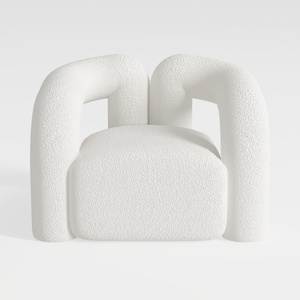
Minimalist Boucle Fabric Armchair Modern Unique Design 3D Model

Minimalist Boucle Fabric Sofa Modern Tufted Living Room 3D Model

Modern Glass Coffee Table, Oval Coffee Table for
Homestyler is an easy-to-use online home design platform that offers powerful 3D rendering tools, a vast collection of interior design projects, and helpful DIY video tutorials to inspire and guide you in creating your perfect space.
Projete agora para LIVRE
































