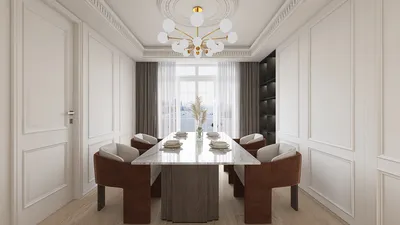


In today’s digital age, immersive experiences like those offered by virtual reality platforms such as Stranger Than Heaven invite us to rethink how our living spaces can support new forms of entertainment and interaction. As technology integrates seamlessly into everyday life, designing home environments that accommodate cutting-edge gadgets and promote comfortable, engaging experiences becomes essential. Thoughtful spatial planning and adaptable furniture can transform any room into a personal sanctuary for both relaxation and innovative digital exploration.
Rearranging furniture requires physical effort and commitment; once a piece like a bookshelf is placed against a wall, it tends to stay there for years because moving it again involves a complex process of clearing, pulling, and navigating it through doorways. Many people have experienced rearranging a room only to find that the new configuration is less satisfying than the original setup.
Utilizing a no-cost online room planner eliminates this hassle before any physical move. Users can draw their room, digitally position furniture, toggle between layouts in seconds, and determine if an arrangement works well—all before lifting a finger. This browser-based process takes about 20 minutes and can save hours of trial and error with actual furniture.
This article explores how digital room planners function, highlights the top free options available in 2026, and explains the best ways to craft a room design you’ll genuinely appreciate. A favored tool for this purpose is Homestyler, which offers intuitive layout design and realistic visualization features to enhance the planning experience.
Why Visualizing First Transforms Your Design Approach
One common error when rearranging rooms is relying solely on spatial intuition. Human perception often miscalculates necessary clearances around sofas, the practicality of dining table placement, or whether chairs face each other comfortably without crowding.
Room planners make abstract judgments tangible. For instance, dragging a 90-inch sectional into a 12-by-14-foot space and seeing only 18 inches of walkway instantly shows the impracticality, sparing you from multiple frustrating attempts. Experimenting with floating furniture within a planner like Homestyler can even reveal how the room could feel larger, giving you confidence to try these layouts in reality.
Visual tools also expose subtle issues not obvious from mere measurements—such as doors opening into seating, diagonal traffic routes that disrupt flow, or awkward TV viewing angles—elements that cause a room to feel uncomfortable despite acceptable furniture sizes.
Capabilities Offered by Quality Free Room Planners
Browser-based planners have advanced substantially by 2026. The best free platforms, including Homestyler, provide features once exclusive to premium desktop software:
Precise room drawing enables exact walls, doors, and windows placement, incorporating architectural nuances like bay windows or columns, resulting in a true-to-scale floor plan that accurately reflects dimensions.
Drag-and-drop furniture modeled to manufacturer specifications ensures that if an item fits in the digital room, it will fit physically. For example, standard king beds measure 76 by 80 inches, and typical three-seat sofas range from 84 to 90 inches wide, which tools like Homestyler faithfully replicate.
Instantaneous 3D previews let users switch seamlessly between 2D layouts and immersive 3D views that demonstrate spatial feel—how light enters, sight lines, ceiling height, and whether the arrangement promotes flow or congestion.
Many free planners allow saving and sharing designs without mandatory account registration, facilitating collaborative reviews via shareable links with partners or family members.
Top Free Room Planning Tools in 2026
Among the leading free room planners available today is Homestyler, which combines precise room measurement input with an extensive furniture library and real-time 3D rendering. This tool’s photorealistic visuals help users perceive how elements such as lighting, shadows, and textures mimic reality, enhancing design accuracy and engagement.
Its furniture catalog covers essentials like sofas in various styles, dining tables in standard dimensions, beds across common sizes, and kitchen and bathroom fixtures. Every piece can be rotated, resized, and repositioned with intuitive drag controls, while the 3D view updates instantaneously.
The free offering of Homestyler is comprehensive, with no hidden fees interrupting projects. It also supports autosave and synchronization across sessions, allowing designs to be revisited or shared effortlessly later.
Ideal users are those planning room rearrangements, furniture purchases, or interior redesigns seeking both precise layouts and authentic visualizations.
Other noteworthy tools include Planner 5D, known for its user-friendly browser interface and mobile app integration, suitable for users managing smaller rooms and basic furniture placement, and RoomSketcher, which prioritizes 2D floor plan accuracy for real estate or rental purposes. Floorplanner offers simplicity and ease for single-room projects without much prior experience.
Tailoring Room Layout Strategies by Space
Different rooms necessitate different planning priorities:
Living rooms require careful consideration of seating arrangements relative to focal points like TVs or fireplaces. For example, viewing distances of about 8 to 13 feet are ideal for a 65-inch television, while walkways should maintain 30 to 36 inches clearance. Floating furniture away from walls can enhance perceived space.
In bedrooms, bed placement often serves as the anchor—commonly placed opposite the door or on walls with fewer windows. Maintaining at least 24 inches clearance around the bed allows comfortable movement and upkeep.
Dining rooms must allocate sufficient space around tables for chair movement and passage, typically 36 to 48 inches. Room planners help size dining tables appropriately based on room constraints.
Home offices benefit from optimal desk positioning to balance natural light and video call backdrops; placing a desk near but not facing a window reduces glare and visual distractions. Cable management planning is also critical.
Efficient Room Planning in Under 20 Minutes
A typical workflow using a free planner like Homestyler may be:
Minutes 1–5: Accurately draw the room, including structural features, exterior openings, and built-ins. This ensures a reliable foundation for layout.
Minutes 5–12: Insert major furniture pieces like sofas, beds, tables, and desks, positioning them to meet spatial and functional goals.
Minutes 12–17: Explore alternative layouts by adjusting furniture placement and orientations, challenging initial configurations to discover optimal arrangements.
Minutes 17–20: Switch to 3D visualization for a virtual walkthrough that assesses spatial flow, sight lines, and ambiance, refining details as needed.
Addressing Common Inquiries about Free Room Planners
Are free planners accurate enough for buying real furniture? When tools use manufacturer's real dimensions—as Homestyler does—the digital representation matches reality closely. However, confirming product specifications before purchase is advisable.
Can existing furniture be incorporated? Since brand-specific older models are rare, using generic equivalents resized to correct dimensions suffices for layout planning.
Difference between room planners and floor plan tools? Room planners focus on furnishing and circulation within individual rooms, while floor plan tools encompass entire properties, useful for renovation or architectural design.
For full property designs, begin with free floor plan creators for overall structure, then employ room planners to refine individual spaces.
Begin Designing Before Moving a Thing
Spending just 20 minutes with a room planner like Homestyler replaces expensive and laborious physical attempts at rearranging furniture. Digital iterations cost nothing and are instantaneous, unlike the time and effort real-world changes demand.
Starting your design journey digitally ensures a smoother, more satisfying outcome when you finally move furniture into place.
Ready to transform how you view your living space? Use Homestyler’s online platform to draw rooms to scale, furnish with accurate measurements, and preview your entire layout in immersive 3D before making any physical changes.
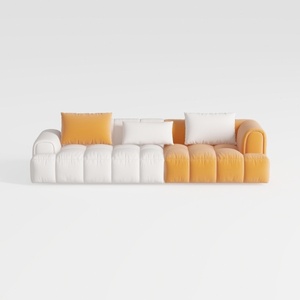
Modern Two Tone Fabric Sectional Sofa With Throw Pillows 3D Model

Modern White Lacquer Gold Metal Frame Office Desk With Storage Drawers 3D Model
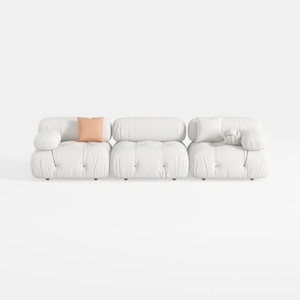
Minimalist White Fabric Modular Sofa 3 Seater 3D Model
Homestyler offers an easy-to-use online design tool with stunning 3D renderings, inspiring interior projects, and helpful DIY video tutorials. It’s ideal for anyone looking to create and visualize beautiful home designs effortlessly.
Projete agora para LIVRE
































