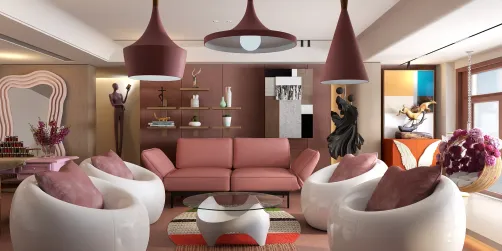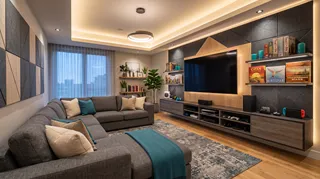
- Console or PC gaming: screen position, comfortable seating, controller storage, and cable access.
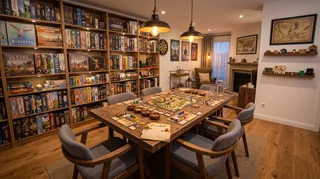
- Board games: a table with enough usable surface, chairs that can be pulled out, and nearby game storage.
- Movies and sports: seating with a clear view, controllable light, and space for shared viewing.
- Mixed use: flexible furniture, closed storage, and a layout that can change without heavy lifting.
- Occasional guests: extra seating that can be moved or folded away when it is not needed.
A game room can be a console setup, a board-game corner, a place to watch films, or a flexible space that does a little of everything. The best game room decor ideas start with how you actually plan to use the room—not with a shopping list of themed signs and neon lights. Once the activities are clear, it becomes easier to choose furniture, lighting, storage, and colors that support them.

1. Choose the room’s main activity before decorating
Start by deciding what the room needs to do most often. A space designed around console gaming has different priorities from one used for tabletop games or movie nights. If the room serves several purposes, identify the activity that needs the most space and make the other uses easy to add or put away.
Think through a typical session. How many people will be there? Will they sit at a table, on a sofa, or at a desk? Do you need room for controllers, board-game boxes, a headset, snacks, or a second screen? These practical questions help prevent a common decorating mistake: buying a large centerpiece that looks impressive but leaves too little room to move.
A simple planning list can clarify priorities:
I usually recommend choosing one primary activity and no more than two secondary ones. That keeps the room from becoming a collection of unrelated setups. If you are still deciding between layouts, sketch the room or test furniture placement in Homestyler before committing to large pieces.
2. Plan the layout around movement and sightlines
A good layout makes it easy to enter, sit down, play, and leave without squeezing past furniture. Measure the room, including doors, windows, closets, radiators, and outlets. Then mark the furniture footprint on the floor with painter’s tape. This quick test reveals whether a sofa, gaming desk, or table will crowd the route through the room.
For a screen-based setup, place the display where it can be viewed comfortably from the main seat. Avoid putting it directly opposite a bright window if reflections are likely. A slight change in screen or seating position may solve glare more effectively than adding heavy curtains.
For tabletop games, prioritize the table’s usable surface and the space around it. Players need room to pull out chairs and move around the table. A compact table that fits the room comfortably is often more useful than a larger one that blocks circulation.
In a multipurpose room, create zones without building barriers. A rug can define a seating area, while a desk lamp or wall shelf can distinguish a gaming station. Keep the main walkway clear, and avoid placing frequently used items behind the largest piece of furniture.
Before buying, check the layout from several viewpoints:
- Can you enter and cross the room without detouring?
- Can everyone see the screen or reach the table?
- Can doors, drawers, and chair backs open fully?
- Are outlets accessible without stretching cords across walkways?
- Is there a place to set down drinks away from electronics?
A floor plan can help compare options, but it cannot tell you whether a chair feels comfortable or a screen causes glare. I recommend testing the arrangement in the room with temporary markers, then adjusting it after a short trial.
3. Layer lighting for screens, tables, and downtime
Lighting affects both comfort and atmosphere. A single bright ceiling fixture can make a room feel flat, while a dark room with only a screen may be tiring for some people. Use more than one light source so you can adapt the room to different activities.
A practical combination includes:
- Ambient light: a ceiling fixture or indirect lamp for general visibility.
- Task light: a desk lamp or adjustable light near a gaming station or tabletop.
- Accent light: a subtle strip or small lamp that adds color without becoming the only source of illumination.
For screen use, position lights so they do not reflect directly on the display. Indirect lighting behind or beside the screen can soften the contrast between a bright image and a dark room. For board games, make sure the table is evenly lit and that the light does not cast strong shadows across the playing surface.
Color-changing lights can add personality, but they are not a substitute for useful illumination. Choose a setting that suits the activity, and make sure the room can return to a neutral, comfortable light for reading, cleaning, or finding small pieces. Dimmers or separate switches make this easier.


4. Make storage part of the design
Controllers, cables, headsets, board games, cards, and accessories can quickly take over a room. Storage works best when it is close to where each item is used. A small tray beside the sofa may be more effective than a large cabinet across the room.
Use a mix of open and closed storage. Open shelves make frequently used items easy to reach and can display a few favorite objects. Closed cabinets hide visual clutter and protect equipment from dust. Keep heavier items on lower shelves, and avoid stacking delicate electronics where they can be knocked over.
Useful storage options include:
- A drawer or bin for controllers, charging cables, and spare batteries.
- Shelves sized to fit board-game boxes upright.
- A cable tray or clips to keep cords off the floor.
- A small basket for remotes, cards, and accessories.
- A cabinet with ventilation for equipment that produces heat.
Labeling bins can help a shared room stay organized, especially when several people use the same equipment. Leave some empty capacity, too. Storage that is already packed to the top is difficult to maintain when new games or accessories arrive.
Cable management deserves attention early. Group cords by device, secure them along furniture or walls with suitable clips, and keep them away from walking paths. Do not cover ventilation openings or bundle equipment cables in a way that traps heat. If you are planning a new arrangement, map the furniture and storage together in Homestyler so you can spot awkward gaps before moving heavy items.
5. Pick a palette that supports the mood
A game room does not need to look like an arcade to feel playful. A restrained base palette can make the room easier to live with, while a few colorful details provide character. Consider the room’s existing finishes, the amount of natural light, and whether the space connects visually to other rooms.
A balanced approach might use:
- A calm base: warm white, charcoal, muted blue, or another color that works with the room.
- One accent color: used in cushions, a rug, artwork, or a small lighting detail.
- A few personal objects: framed game art, collectibles, or a display shelf with room to breathe.
If you want a bold wall, choose one surface rather than applying a strong color everywhere. A feature wall behind a screen or desk can anchor the setup without making the whole room feel visually busy. Removable art, posters, and fabric panels are useful options for renters or anyone who likes to change the look over time.
Coordinate finishes rather than matching every item. For example, a dark desk can work with lighter shelving if the colors repeat elsewhere in the room. A rug can connect the seating and gaming zones, while a few repeated accents make different furniture pieces feel intentional.
6. Improve sound without turning the room into a studio
Sound matters in a room used for games, films, or group activities. Hard surfaces can make voices and effects feel sharp or echoey. Soft furnishings help absorb some reflected sound and can make the room more comfortable.
Start with simple changes: add a rug, curtains, upholstered seating, or fabric-covered cushions. If the room still feels lively, consider acoustic panels designed for interior use. Place them where they can reduce reflections without blocking doors, vents, or access to equipment.
Acoustic treatment is not the same as soundproofing. Panels and soft materials can reduce reflections inside a room, but they do not reliably stop sound from traveling through walls or floors. If noise transfer is a concern, identify the source and consider appropriate construction or building advice rather than expecting decorative panels to solve it.
For speakers, position them so sound reaches the seating area without placing equipment where it can be bumped. Keep volume controls accessible, and consider headphones for late-night gaming in a shared home.
7. Adapt the ideas to a small or shared room
A small room can still work well if each item earns its place. Choose furniture with a clear purpose, and look for pieces that can serve more than one activity. A storage ottoman can provide seating and hold accessories; a folding table can support board games and be put away afterward.
Use vertical space carefully. Wall shelves can free floor area, but they should be securely installed and not overloaded. A narrow cabinet may provide more useful storage than several small pieces scattered around the room. Keep the floor as open as possible, especially near the entrance and around chairs.
For a shared room, make the setup easy to reset. Store controllers in one labeled drawer, use a basket for loose accessories, and choose a table or desk that can be cleared quickly. If the room also functions as a guest room or home office, prioritize furniture that can be moved or folded without disrupting the entire layout.

A simple checklist before you buy
Use this checklist to keep decorating decisions grounded in the room’s real needs:
- Measure the room and note doors, windows, outlets, and fixed features.
- Decide which activity needs the most space.
- Test the furniture footprint before ordering large pieces.
- Check screen visibility and likely glare at different times of day.
- Plan task lighting for desks and game tables.
- Put storage near the items it needs to hold.
- Keep cables and walkways separate.
- Add soft materials if the room sounds echoey.
- Leave some open space for movement and future changes.
Frequently asked questions
What should a game room include?
Start with the essentials for the main activity: comfortable seating, a suitable screen or table, useful lighting, and storage for equipment. Add decorative pieces after the layout works. The right setup depends on whether the room is mainly for video games, board games, movies, or a mix.
How can I decorate a game room without making it look cluttered?
Choose a limited palette, display only a few meaningful objects, and use closed storage for small accessories. Keep shelves from becoming packed, and leave clear surfaces for actual play. A room feels more considered when each item has a place.
How do I make a game room feel comfortable for long sessions?
Prioritize seating that suits the activity, provide adjustable lighting, and keep frequently used items within reach. For screen-based play, reduce distracting reflections and avoid relying on a completely dark room if that feels uncomfortable. Take breaks and adjust the setup to the people using it.
What are good game room ideas for a small space?
Use compact or multipurpose furniture, make use of vertical storage, and keep the center of the room open. A folding table, storage ottoman, or wall-mounted shelf can add function without permanently taking up much floor space.
How can I plan a game room before moving furniture?
Measure the room, sketch the main pieces to scale, and mark their footprints on the floor. Check walking routes, chair clearance, screen views, and outlet access. A digital layout tool such as Homestyler can help compare arrangements, but a real-world test is still useful before you buy.
Make the room yours
Homestyler's roots trace back to Autodesk, the global leader in design and engineering software. That heritage lives on in every feature we build. Today, with a community of more than 20+ million registered users (platform data, 2026) worldwide, Homestyler continues to make professional-quality interior design accessible to everyone — from first-time decorators to seasoned architects.
A successful game room is not defined by a particular theme or expensive equipment. It is a space where people can play, watch, gather, and put things away without fighting the layout. Start with the activity, make movement and storage practical, then add color and personal details at a pace that suits your budget. When the room works well, the decor feels natural rather than forced.
Projete agora para LIVRE








![Design [4]](https://hs-designs.homestyler.com/production/design/images/07c2de3a-88ec-4be8-8910-ff255b795bc2/1731419398293/7841697.jpg?x-oss-process=image/resize,w_502,m_mfit/format,webp)