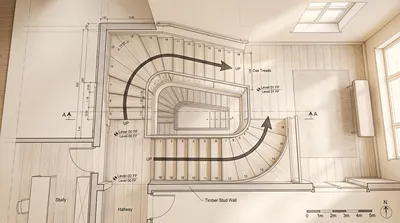




- Mark the opening and boundaries. Draw the stairwell walls and the opening through the floor above. Include nearby doors, corridors, and structural elements that could affect access.
- Choose a stair configuration. A straight flight is easy to read but needs a longer run. L-shaped and U-shaped stairs turn at a landing and can fit a compact footprint. Spiral stairs use less floor area but may be harder to use and are subject to local restrictions.
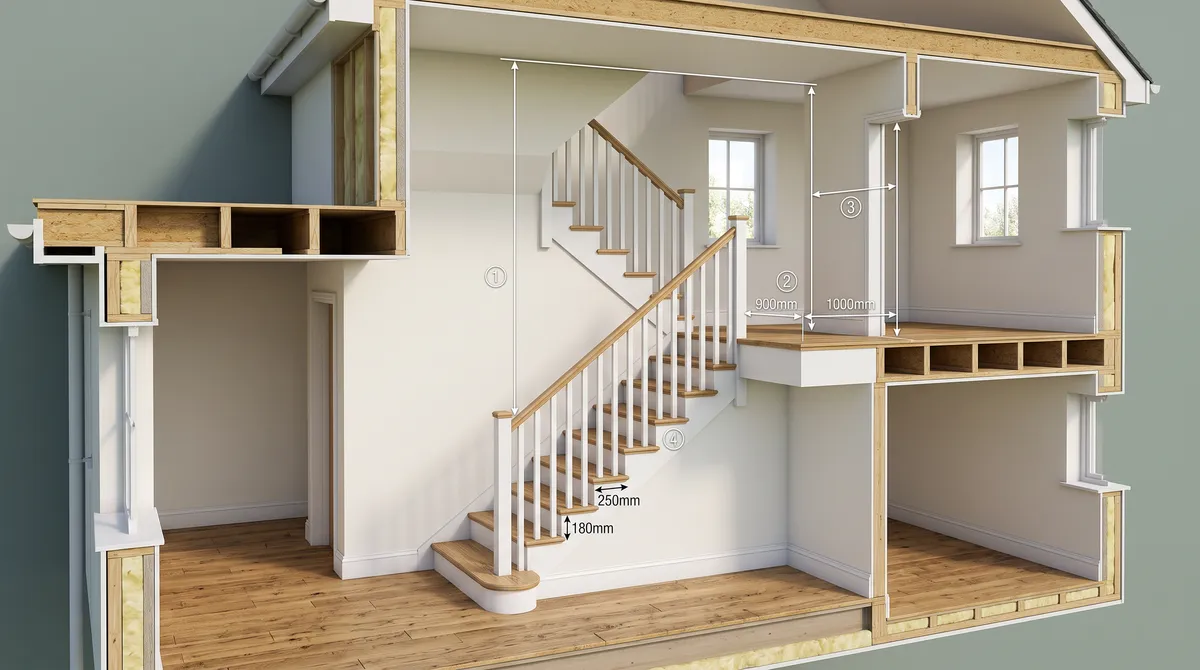
- Establish the rise and run. Divide the total vertical rise into equal risers, then determine the horizontal run from the number and depth of treads. Do not estimate the stair by eye if the drawing is intended for construction or review.
- Draw the flight and landing. Show the stair edges, tread divisions, and any intermediate landing. Keep the landing visibly distinct from the steps.
- Add direction and level information. Use a clear arrow and “UP” or “DN” label where needed. State the level or elevation if the plan set requires it.
- Check the plan at its intended scale. Make sure the treads remain legible, the arrow does not obscure them, and the stair does not collide with doors or circulation paths.
Stairs occupy a small patch of a drawing but connect two levels, affect circulation, and can determine whether a layout works. A useful floor plan stair symbol should tell the reader where the stair begins, which way it rises, how it meets the upper floor, and whether the surrounding space is clear. It is more than a row of parallel lines.

What a stair symbol communicates
On a plan, a staircase is usually represented by a sequence of tread lines within a stairwell outline. The lines indicate the run; an arrow or a label such as “UP” or “DN” clarifies the direction of travel. The exact graphic convention varies by office, drawing scale, and jurisdiction, so consistency across the drawing set matters more than copying one universal symbol.
A plan is a horizontal slice through a building, not a three-dimensional view. The cut plane may pass through the lower part of the stair, while the upper flight continues above it. Drafters commonly distinguish the portion below the cut plane from the portion above it with line weight, dashed lines, or a break line. Check the project’s drafting standard before deciding which convention to use.
A reliable way to draw stairs on a floor plan
Start with the space, not the symbol. Confirm the floor-to-floor height, available stairwell footprint, intended stair type, and where the stair connects on both levels. Then draw the stair so its geometry and annotations agree.
For a quick concept sketch, a simplified symbol may be enough. For permit or construction documents, the plan should coordinate with sections, elevations, dimensions, and applicable building requirements.
Choosing a stair layout for the available footprint
The best stair type depends on the building geometry and how people will use it. A compact shape is not automatically a good solution if it creates awkward turns, narrow clearances, or difficult access.
| Stair type | Typical plan appearance | Main planning consideration |
|---|---|---|
| Straight | One continuous run of parallel tread lines | Needs a longer uninterrupted footprint |
| L-shaped | Two runs meeting at a quarter-turn landing | Landing and turn must be sized and shown clearly |
| U-shaped | Two parallel runs with a half-turn | Efficient use of length, but requires width for both flights |
| Winder | Treads turn around a corner without a square landing | Tread geometry and walking line need careful checking |
| Spiral | Curved or circular arrangement around a center | Verify usability, clear width, and local code acceptance |
In my experience, the most common early design problem is reserving space for the visible stair run but forgetting the opening above it. A stair can fit on the lower-floor plan and still conflict with the upper-floor layout or headroom. I recommend checking both levels together before refining the symbol.
Dimensions and code checks to keep in view
A floor plan symbol alone cannot prove that a stair is safe or code-compliant. Requirements depend on the adopted code, building type, and local amendments. In the United States, the International Residential Code (IRC) includes provisions for stair geometry, landings, handrails, and headroom; the applicable edition and local authority must be confirmed for each project.
For example, the IRC’s residential stair provisions generally limit riser height to 7¾ inches and require a minimum tread depth of 10 inches, subject to the code’s measurement rules and exceptions. These are not universal dimensions for every building or jurisdiction. Commercial stairs may be governed by a different code, and existing buildings can have separate rules.
Use the plan to coordinate the items that need verification:
- Total floor-to-floor rise and the number of risers
- Consistent riser heights and tread depths
- Stair width measured as required by the applicable code
- Landing dimensions at the top, bottom, and turns
- Headroom along the stair and at the opening
- Handrail and guard locations
- Door swings and circulation clearances near landings
Do not label a conceptual drawing “code compliant” based only on a typical dimension. Confirm the governing code and have the design reviewed by the responsible professional or building official.
Common drawing mistakes and how to prevent them
A stair symbol can look polished and still leave important questions unanswered. These checks catch the problems that most often make a plan confusing or impractical.
- No direction marker: Readers cannot tell which end is the start. Add an arrow and a concise UP or DN label.
- Treads drawn without a landing: A turn should not be represented as a vague cluster of lines. Draw the landing boundary and show how each flight meets it.
- The upper flight is unclear: Use the project’s line convention to distinguish the portion above the plan cut from the visible lower flight.
- The opening is missing: Show the floor opening and coordinate it with the upper-level plan and section.
- The stair is dimensioned from a rough sketch: Calculate the rise and run, then verify the resulting geometry against the applicable rules.
- Nearby doors are ignored: Check door swings and landing clearances so a door does not open into an unsafe or unusable area.
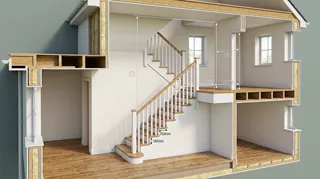
My advice is to review the stair in plan and section before calling the layout finished. A section reveals vertical relationships that a top-down drawing cannot show, including headroom and the connection between floors.
Floor plan stairs: a practical review checklist
Before sharing a floor plan, confirm that the stair drawing answers these questions:
- Where does the stair begin and end?
- Which direction does it rise?
- Are the flights, turns, and landings easy to distinguish?
- Is the floor opening shown on the relevant level plans?
- Do dimensions and annotations match the stair geometry?
- Have headroom, door swings, and circulation been checked?
- Has the design been compared with the correct local code and drawing standard?
A 3D model can help resolve spatial questions that a flat plan leaves open. You can test a stair layout in Homestyler to inspect how the stair relates to rooms and circulation, then return to the dimensioned plan for technical coordination. Use the model as a visualization aid, not as a substitute for code review.
Make the stair legible before making it decorative
Good floor plan stairs are easy to interpret at a glance and accurate enough to coordinate with the rest of the design. Draw the footprint and opening first, show the flights and landings clearly, mark the direction, and verify the geometry against the project’s requirements. When the plan, section, and dimensions tell the same story, the staircase becomes a dependable part of the drawing rather than a symbol readers have to guess at.
For early layout exploration, build and compare room arrangements in Homestyler, then confirm final stair dimensions and compliance with the appropriate professional and local authority.


Built on technology originally developed at Autodesk, Homestyler empowers anyone to design beautiful, realistic spaces in minutes. Join over 20+ million registered users (platform data, 2026) who have already discovered a smarter way to plan, visualize, and bring their dream homes to life — all from the comfort of a browser.
Desafios de Design Vist Projete agora para LIVRE